PCI bus networking cards
Late model PowerMacs use a PCI bus for expansion cards, such as an Ethernet network card. That card has an RJ-45 connector for 10bT Ethernet networks. We have a variety of used PCI 10bT or 100bT Ethernet cards available.
PN593-TP, Farallon EtherMac Card, a PCI card for 10bT Ethernet. Unused. We also have a 30-page manual
and 800K diskette we can copy. (The manual covers the EtherNet and EtherWave product.) Card with copy of manual and disk is $35 plus shipping.
Network cards for the SE/30 are always in demand. We maintain this listing even when we are out of these SE/30 adapters. We'll quote prices only when units are available.
The IIsi has the same PDS slot but
because of the space limits in the SE/30, some IIsi network cards will not fit the SE/30.
Many of these network cards include a socket for a coprocessor.
I sell the 68882-20Mhz FPU coprocessor chip seperately, follow this link.
The coprocessor is not needed for the SE/30, which already has this chip on the motherboard. It's an option for
use with the IIsi; otherwise it's operation is simulated by Mac software. If your software would benefit from
a floating-point math coprocessor, chances are the documentation for that software will tell you this.
Asante MacCon Ethernet network 2-card set, for SE/30 OR IIsi
with 10bT, 10b2 and 10b5 support and FPU coprocessor socket. This
card mounts inside the SE\30. Models I have sold are:
"Mac Con for IIsi SE30 P/N 09-00005-00 rev.C2" or "C1" and
"Mac Con 30ie MCPT P/N 09-00005-00 rev.C2" or "C1". Either has an
attached network interface card, as described below. Also available is a
50-page manual (copy) and install/diagnostic diskette! Plugs into the PDS
socket, has a pass-through connector for another PDS adapter card.
The network card of this set says "Asante Technologies Inc,
MacCon+ TK/TP rev B". There is an RJ-45 connector (10bT) and a
15-pin DB-15 connector (10b5, thick Ethernet). Some models have
a BNC connector (10b2, thin Ethernet); specify this if you need it.
LEDs show network status. Units without the BNC/10b2 connector have a
switch with positions labled "TPL TPN TK"; units with the BNC have a
jumper for these options.
The Mac PDS card of some sets says "Mac Con for IIsi SE/30 PN 09-0005-00
Rev C2"; or "Mac Con 30ie MCPT P/N 09-0005-00 Rev C1" - but these units
look identical. It has the math coprocessor option: a socketed 68882 at
20MHz, used with the IIsi but NOT with the SE/30 (it has a coprocessor).
These two cards are cabled together, cables included.
Asante MacCon Ethernet card, as above, for SE/30 or IIsi. TechWorks FPU coprocessor & network card set for IIsi ONLY, ask if available and price, read further. These cards are dated 1992.
These two cards are cabled together, cable included. This card WON'T FIT in an SE/30 chassis
to reach the SE/30 PDS slot because the chassis is in the way. Techworks
manual and install diskette available, may be PDF and copied disk, keep reading.
For the above TechWorks IIsi card set, I have
a Techworks manual and disk, follow the
link for details. We have a few sealed boxed sets of these cards at extra cost,
that includes an original diskette and manual. Otherwise we provide copies.
Farallon PN594-TP, Ethernet network 2-card set, for SE/30 OR IIsi
with 10bT, 10b2 and 10b5 support and FPU coprocessor socket. This
card set mounts inside the SE\30. Models I have sold say
"Farallon 5000118-00-01". One card plugs into the PDS
socket of the IIsi or SE/30. The other card is an
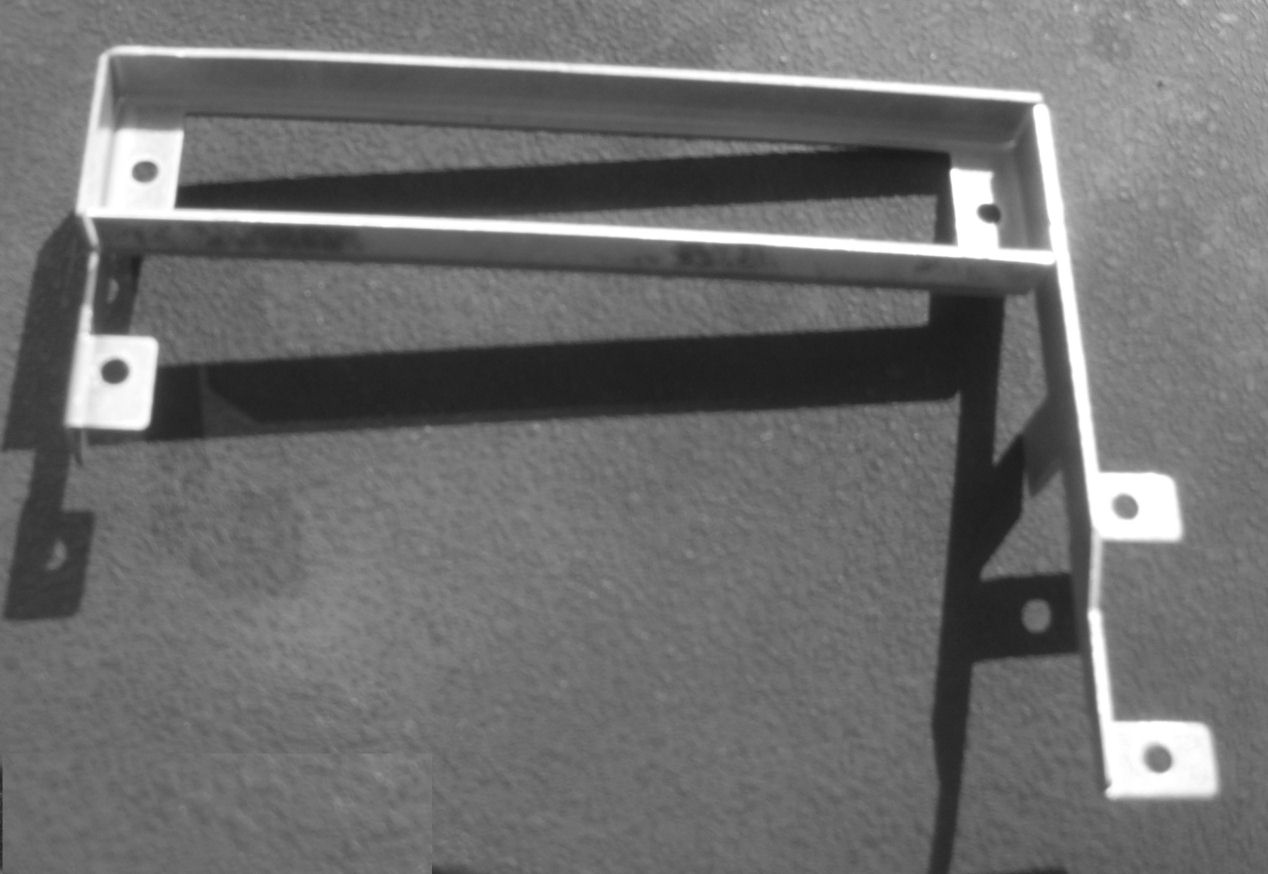
network interface card with RJ45 (10bT) connector. $?? plus shipping. metal bracket for SE, SE/30 back panelThe network card set, has a PC board with
network cable connectors. On the SE/30 or SE, there's a metal bracket to hold that card, so the
connectors are accessable on the back of the SE or SE/30 through a removable back panel.
Here's a photo of that bracket. Be sure your SE or SE/30 has that bracket when you
purchase your network card. I do not have many of these to offer.
SE/30 IIsi Asante Token Ring card set unused. I have one unused set in box, Asante MacRing IIsi 00-00024-011
from 1993. Should fit IIsi and SE/30 PDS slot. Shielded twisted pair connections to TokenRing networks. This is not Ethernet! Box says "System 7 .. TokenTalk, Novell Netware 3.11, Apple 1PC, Mac-to-IBM 3270, Lan Manager, Banyan vines, TCP/IP" *compatible*. "includes MacRing Manager network config and diag software for your Mac". 4 or 16 MBPS. No guarantees of performance.
I sometimes have SE Ethernet card-sets. Ask for details and costs. They are similar brands
to the SE/30 Ethernet cards shown above. Also check that your SE has the metal
bracket to hold the network connector card at the back of the SE.
Not an Ethernet card but a DCA brand "IRMA" network card for the SE PDS slot. 80-20106-000 rev B.
With DCA chip 02-99906-000. dated 1987-88. to enable Mac IRMA 3270 emulator programs to connect to IBM mainframe
computers under CFT or DFT Distributed Function Terminal. We have no software or docs, just the board and coax connector, sold as-is no warranties. Ask if still available and price.
The following are external Ethernet adapters for Mac computers.
We may not have these available when you contact me.
They all attach to the Mac's DB-25 connector SCSI port.
See this link for manuals and software for some of these items. For SCSI cables at extra price,
see my Mac Laptop SCSI cables section. .
Asante "Micro EN/SC", a laptop SCSI to RJ-45 (10bT) Ethernet interface.
This small plastic box plugs into the back of a Mac laptop via that
square 30-pin SCSI connector on some Mac laptops; and it also plugs into
the ADB port (mouse/keyboard connector) with a pass-through connector
to obtain power. The output is an RJ-45 connector as noted. OUT in 2026
look here for disks and manuals
Asante "EN/SC", a SCSI to RJ-45 (10bT) Ethernet interface.
This box has a SCSI connector (DB-25) to attach to a Mac SCSI port.
It uses a 12V AC external power supply at 1.25 amps.
The output is an RJ-45 connector for Ethernet.Shipping weight 6 lbs. Asante "EN/SC-10T", a SCSI to RJ-45 (10bT) Ethernet interface.
This box has two SCSI connectors (DB-25) to attach to a Mac SCSI port.
It uses a 12V AC external power supply at 1.25 amps.
The output is an RJ-45 connector for Ethernet. OUT in 2026
Shipping weight 6 lbs. look here for disks and manuals
Asante "Mini EN/SC 10T", a SCSI to RJ-45 (10bT) Ethernet interface.
This box has a SCSI connector (DB-25) to attach to a Mac SCSI port.
The output is an RJ-45 connector for Ethernet. Uses 12V AC or DC wall power supply.
Shipping weight 3 lbs. look here for disks and manuals OUT in 2026
Dayna "Ether+", a SCSI to Ethernet interface. May be by "Compatible
Systems", this box has a SCSI connector (DB-25) to attach to a Mac SCSI port.
The output is an DB-15 or BNC connector for Ethernet. You'll need a
SCSI cable. Box is about 5" X 6" X 1.5". (Needs A/C adapter, 9V to 12V DC
center positive.) OUT in 2026 Shipping weight 4 lbs. look here for disks and manuals
Dayna PORT or DaynaPort SCSI/Link SCSI to Ethernet adapter model DP0800. DaynaPORT SCSI/Link-3 SCSI to Ethernet adapter model DP0802. Dayna Pocket SCSI/Link-T SCSI to Ethernet adapter model DP0901.
Module with DB-25 SCSI connector and HD-30 laptop SCSI connector,
and a 10bt RJ45 Ethernet connector. Needs exernal DC supply.
(apparently 5 volt center positive) OUT in 2026 look here for disks and manuals
Dayna DaynaPORT E/Z SCSI to Ethernet adapter model DP0600.
Module with miniDIN-8 connector to a computer (I think, YOU confirm)
and RJ45, DB-15 and BNC Ethernet connectors. Needs exernal DC supply.
tell me if you can determine polarity, voltage,
current requirements. OUT in 2026 look here for disks and manuals
See this link for manuals and software for some of these items.
For SCSI cables, see my Mac Laptop SCSI cables section.
The upper connector with many square holes is the "LC PDS SLOT" connector as marked in yellow at the left end. Typically cards for this connector mount "sideways" or horizontal, and are a few inches by several inches long.
The lower connector with a long single slot is the "COMMUNICATIONS SLOT" connector, as marked in yellow below and leftwards of that connector. Typically cards for this connector mount vertically and are only an inch or so tall by several inches long.
LC slot adapters were originally for the Mac LC, LCII, and LCIII; Apple also designed an "LC slot" into many other Macs to accept these LC-type or LC-slot network cards. Apple also designed a comm slot, for video, network and modem cards, into some PowerMac and 68040 Macs. I have a partial list of such Macs at this link, or check the technical info on your Mac.
The LC slot cards below plug into the LC-type slot, and (unless noted) has
an RJ-45 connector for "10bT Ethernet" network connections. These cards should
all perform similarly. I may have
others, ask about specific brands. many of these network cards include a socket for a coprocessor.
The 68882-20Mhz FPU coprocessor chip sold seperately, follow this link. Ask for prices and availability, as of aug 2024 I have the following:
Farallon / DynaPORT E/LC-M, network adapter *OUT* I have an Asante manual and disk offer for the Asante LC cards.
Boxed unused Asante MacCon MCiLC-10T I have three boxed unopened Asante MCiLC Ethernet cards. These are for the LC slot. Box includes card, drivers diskette, manual, short Ethernet (RJ45) cable. $69 plus shipping.
Apple's comm slot or communications slot is a connector inside some
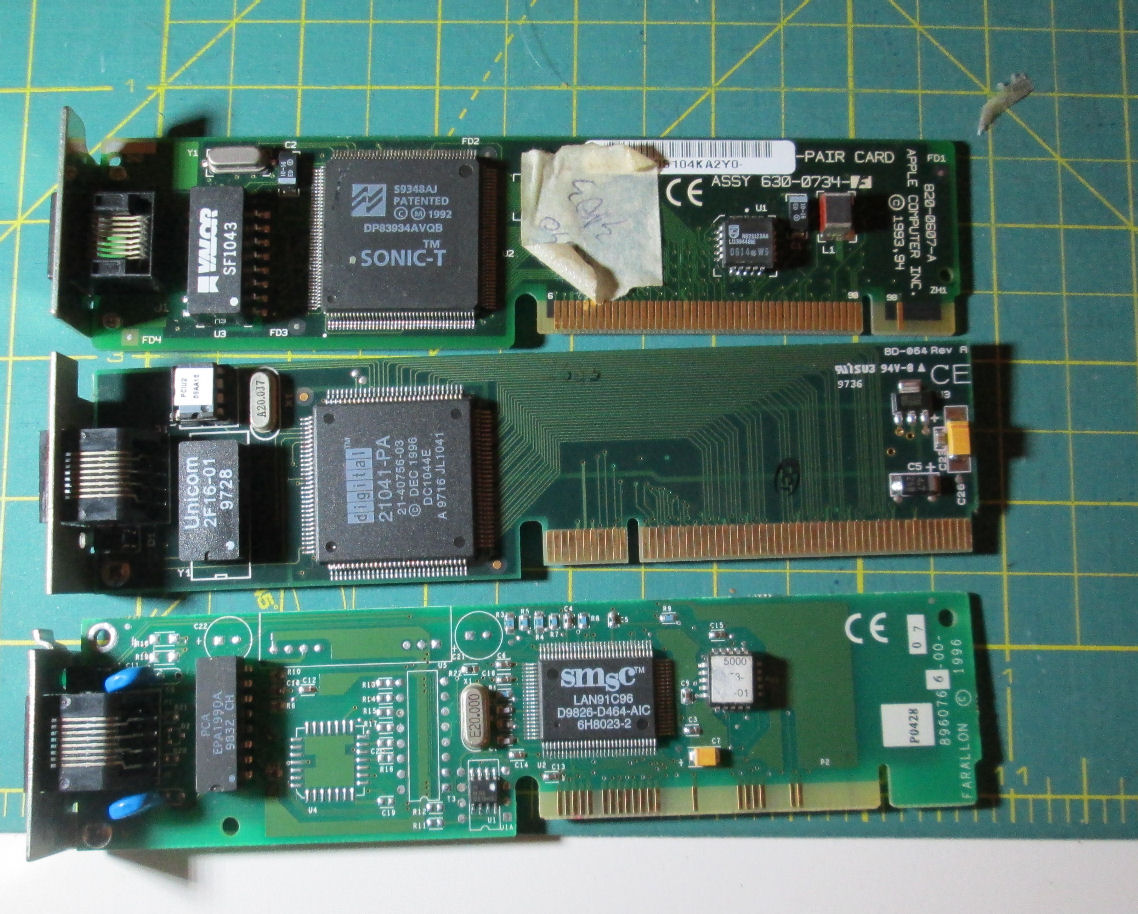
Macs which holds either a network card OR a modem card. There was a Comm Slot I type, and a Comm Slot II type. The Type I connector has a notch near the back of the edge connector; Type II has a notch near the front of the connector. "Front" is near the center of the card. I have a partial list of Macs and comm slots at this link, or check the technical info on your Mac or check Apple's Web site. Comm slot network adapters I'm aware of include for Comm Slot I: Apple brand 820-0607-A or 820-0514-A ; Farallon 8960766-00; Dayna Daynaport E/CS-T. For Comm slot II: Apple 820-0784-A CS II Twisted Pair Card, Apple 820-0809-A. The following is what I have as of Dec 2020. Ask for prices and availability; the Comm Slot I's are more common and cheaper.
Comm slot I: notch near end of board here's a photo of some CS network cards: Note: non-network "LC slot" or "comm slot" cards will be listed
on this Web page section of NuBus Mac cards.
To provide some information and software, I'm offering an
Asante MacCon Family 80-page installation guide and diskette. The guide covers
Asante network products: MacCon NuBus, 610, LC, IIsi, 30i. Also
MacCon-i NB-10T, NB-TN, LC-10T. Also MacCon+ 610ET, 30iET64, SE, SEET.
Also MacCon3 for SE, IIsi, 610. There is also
an EtherTalk install diskette, Version 5.5.4. Copy of 80-page Manual and
install disk $10 plus shipping; 1.4M disk only $7.
But you might also check Asante's site
at this link as of 2006.
I have a Techworks "Ethernet Installation Guide"
for these TechWorks Ethernet cards: SE 10T, SE/30 10T, NuBus 10T,
LC 10T, SE thin, SE/30 thin, NuBus thin,
LC thin. The manual is about 110 pages half sized (8.5" by 5.5") and
will be copied two pages per single sided sheet. There is also a diskette
of software, presumably system extensions and related files.
A copy of the manual and the diskette are available
with a TechWorks card for $10 plus shipping.
Copy of Asante EN/SC and Micro EN/SC manual, for the Asante SCSI to Ethernet product.
70 pages (half size copy) and copy of diskette. $10. Copy of Asante AsanteTalk manual, for the Asante Localtalk to Ethernet product.
many half-sized pages. $10. Please note - this device is NOT an "Ethernet interface to the Internet".
It simply borrows your local Ethernet wiring to connect Macs and printers LOCALLY. We have a "drivers diskette" for the Farallon SE/30 network card.
$7 for a copy.
Copy of 60 page Farallon EtherMac adapter manual and diskette. Covers EtherMac
Powerbook adapter, EtherMac Printer Adapter, EtherMac Multiprinter Adapter. $7 for copy.
I don't have Dayna or DaynaPort docs or manuals. A Web search for "Daynaport ethernet mac -pci" may find some references or on-line manuals or software. SInce these sites come and go, it's not useful to list what I found "today" in general. But in 2009 I saw some
apparently active support for Atari use of DaynaPort on this Web site. Also of note were a System 6 supporting Web site. Also I have links to a Mac device driver's museum Web site.
I have modem manuals as well, check my modems section
for specifics.
Follow this link for a brief description of network connectors. The
devices below simply convert between various Ethernet connection types. They are not for Phonenet,
they do not provide Ethernet for Macs or printers which do not already have Ethernet. For instance,
Apple used an "AAUI" connector for their early Ethernet. We have AAUI to RJ-45 adapters as below, so you can connect these
Macs and Apple printers to modern wired Ethernet networks.
Adapters from DB15 to RJ-45 (Thick Ethernet to 10bT ethernet), $15 each. Adapters from AAUI to RJ-45 (Apple network to 10bT ethernet), non-Apple brand $19 each. I don't have, means to convert 10b2 (coax) network cards to 10bT (RJ-45, common wired Ethernet twisted pairs). That
apparently calls for a "Hub or Repeater, 10Base-T/10Base-2". Those appear as old network hub boxes at Web auction sites and electronic flea markets. Sometimes an old hub is a good way to connect slow networks to fast networks. This is
technology out of my experiences. Web search will inform you.
Some people ask about running their Apple-compatible printers off Ethernet.
Follow this link for a brief description of network connectors
and a discussion of printers and Ethernet. I have some SCSI to Ethernet adapters via this link. Also check my Laptop Web page if you want Ethernet for your laptop. Most of these sold without docs or software: but look here for disks and manuals for some of these items.
Note: to run a printer from your Mac, even through an Ethernet network, you still need "driver" software for that brand and model printer, which will run under the Mac OS version on your Mac. Apple of course provided
software drivers; companies like HP produced Apple-compatible printers and (have) provided drivers on hp.com. Check the support information for your printer, to see if you can operate it as I've described.
Farallon EtherWave Printer adapter. Has miniDIN-8 plug, two RJ45 Ethernet jacks.
No A/C adapter with it but I'll include an 8-16V adapter. Sold April 2006
Farallon EtherMac Printer adapter. Has miniDIN-8 plug for Appletalk/Phonenet, RJ45 Ethernet jack, BNC jack for Thinnet. UNUSED IN BOX with A/C adapter, 60-page guide, diskette (don't know OS for drivers). Two available as of Sept 2008.
Farallon EtherMac iPrint adapter. Converts Appletalk/Phonenet (minDIN8) to
Ethernet (RJ45). Will include 8V-16V DC adapter A/C supply. SOLD Jan 06
Asante AsanteTalk Ethernet to Localtalk bridge. This apparently permits a computer's Localtalk miniDin-8 (serial) connection, to connect to an Ethernet network; OR a computer's Ethernet to drive a small Localtalk/Phonenet network. This is not Ethernet networking! This uses Ethernet wiring for LocalTalk printing and Mac-to-Mac connections! Don't buy if you don't know what this means! Some OS X notes from a customer are
at this link.
The device is a small box about the size of a pack of playing cards, with seperate plug-in 12V AC 1250mA A/C supply. Converts Appletalk/Phonenet (minDIN8) to Ethernet (RJ45). Micro AsantePrintLocaltalk to Ethernet adapter for printers. With 12V AC 1.2A a/c adapter, no docs or disks. larger than above unit. $59 plus shipping if available.
look here for disks and manuals for some of these items.
Farallon EtherMac MultiPrinter Adapter Phonenet (Mac miniDIN-8)
and RJ-45 (10bT Ethernet) and BNC (thin Ethernet) connectors. Uses
12V DC plug-in A/C supply. With supply.sold Dec 2002
Dayna Mini EtherPrint-T Box, EP0131, about the size of a pack of playing
cards. With Phonenet and RJ-45 (10bT Ethernet)
connectors. Uses plug-in 5V 1A DC supply, center pin positive. With supply,
$49 plus shipping. Probably OUT in 2026, ask
look here for disks and manuals for some of these items.
Dayna EtherPrint, Box about 5.5" X 7.5" X 1.5", with plug-in
A/C supply (12V 800mA DC center pin positive). With Phonenet (Mac miniDIN-8)
and BNC connector (2bT Ethernet) and DB-15 (thick Ethernet) connectors. $55 plus shipping. I'll include a BNC to RJ-45 network adapter, no guarantees. OUT in 2026. Shipping weight with A/C supply is 4 lbs.
Dayna DaynaPORT E/Z Appletalk printer to Ethernet adapter. Has miniDIN8 connector
for Appletalk to Ethernet connectors; BNC, RJ45 and DB-15 connectors for network. With
A/C supply, 12V center positive connector. $49 plus shipping, shipping weight 3 lbs.
look here for disks and manuals for some of these items.
I have some parallel port to Ethernet adapters. These plug into a printer's
parallel port connector (Centronix 37 pin) and have a Ethernet connector. Most require
some kind of external power supply. We don't supply software, these are untested,
and so sold AS IS. These are listed below.
Xircom pocket ethernet aadapter III parallel port - 1 boxed, 2 used. Extended Systems ESI-2830 printer network adapter, Centronics connector
at one end, BNC and RJ-45 (10bT) connectors at other end. Says "pocket printer
server for Novel NetWare 286/386". Needs AC adapter to
provide DC. 5V at 1A DC, center terminal positive. Untested, no software.
Many of Apple's printers are based on HP "print engine" hardware. And HP produced a number of
printers which supported Appletalk and Macs. I have a number of HP JetDirect printer interface boards for Mac use. These have Ethernet RJ-45 connectors or Appletalk "Localtalk" (miniDIN-8) serial connectors. These plug into the back of some HP printer models. I really don't "list" the cards I have, just check to see if your HP printer uses these cards and let me know accordingly.
AppleTalk is Apple's networking scheme before Ethernet. LocalTalk is Apple's old cable
connector and adapter scheme for Appletalk. PhoneNet is the more popular scheme of using
telephone-like cabling and RJ-11 connectors for AppleTalk networks. Refer to
notes on mixed Phonenet and Ethernet networking for some discussion.
If you are looking for using serial ports and file transfer or "telecomm" software, I discuss that as a question on my Mac Frequent Questions Web page.
Localtalk adapters and cables. The Localtalk connector is round and has three metal pins. Adapters
have two Localtalk jacks, and a cable with a DB-9 or a miniDIN-8 connector. Cables have the Localtalk
connector at each end; there are also couplers with a Localtalk jack at each end. Phonenet adapters, mostly Farallon-type. Two RJ-11 telephone jacks, and one
Mac modem/printer connector (Mac Plus/128K/512K DB-9 or later Apple miniDIN-8) which plugs into
your Mac modem or printer port and into your printer or modem. The terminator is just a RJ11 (telephone) plug with a 120 ohm resistor: you need TWO of them, one at either end of your
Phonenet wiring. Phonenet cabling is a wired telephone cord between the PhoneNet connectors. Prices range for items below are $10 to $20; ask about specific items Farallon Phonenet or similar kits. a 6 foot Phonenet phone cable,
one Phonenet adapter with a miniDIN-8 connector, one Phonenet
terminators, and a manual booklet. All in the original box!
The same kit is available with a DB-9 connector (for the Mac Plus, 128K, 512K).
Ask for prices. Farallon PhoneNET User Guide, over 40 pages, half sized. I'll provide PDF for $3.
We have a few Imagewriter II Appletalk adapters and memory buffers. Check
the printer section for details. Regarding AppleTalk to Ethernet adapters: These
are devices to provide Ethernet access to, typically, printers which do not
have Ethernet ports. I try to obtain these but
they are a little hard to come by. Check our printer Ethernet adapter section
for these devices. Also check my printer and printer upgrades section
for printers that support Ethernet.
PC or Windows related Appletalk
Coactive Connector Corp., Coactive Connector model PC125. Parallel port to RJ-11 (Phonenet) adapter of some kind.
No software, no docs, no guarantees. Includes AC power supply "wall wart". IF available, $19 each plus shipping.
When ordering, please follow this link for
ordering information, terms and conditions, and info about
orders outside the USA.
Here is some connector terminology associated with networks
and modems. I have some adapters to convert between some of
these connection schemes. More information about these connectors and cables are on my cables section of my Mac parts page.
"DB-15" is a D-shaped 15-pin connector, like the Mac video connector: this is used for thick
Ethernet (thick coax cable). "BNC" is a round connector used for thin Ethernet
(thin coax cable).
Some Apple printers may have controller card upgrades which support Ethernet.
Check my Apple printers page for your model. Or you
can use an external Ethernet to Appletalk converter. Many of these converters were
made by Asante and Farallon. For instance an Asante AsanteTalk is
a small box about the size of a pack of playing cards (less the external
A/C supply). This device has an Appletalk connector and a RJ-45
Ethernet (10bT) connector. More discussion may be found on my Mac FAQ page.
Some people ask about running their Apple printers off Ethernet.
Just to be clear on terminology: Most Ethernet in use today (2002) runs
off 10bT networks using twisted pair cables with "phone like" RJ-45
connectors. Some older Mac stuff uses Apple's AUI connector, a very tiny
D-shaped connector, for Ethernet use. Some Apple printers, as well as
many Apple computers,
have Ethernet built in. Look for these connectors to see if that is so.
Apple computers can generally have Ethernet added on. Check my
network adapter section of my Mac
Parts Web page for network cards or adapters for your Mac.
I have converters to adapt the Apple AUI Ethernet port to RJ-45 (10bT)
Ethernet networks. Check my
Ethernet/Appletalk converter section on my Mac networking
page for some of these converters, they are not expensive and they
are pretty small.
A number of vendors made Ethernet to Appletalk (Localtalk) adapters,
for printing or Mac-to-Mac networks over Ethernet cabling. This is not "Ethernet networking"!
Many of them were made by Asante but also Farallon made some.
For instance, I have in front of me an Asante AsanteTalk,
a small box about the size of a pack of playing cards (less the external
A/C supply). This device has an Appletalk connector and a RJ-45
Ethernet (10bT) connector.Driver software and docs for these are generally
available on the Web, if you use Google to search for them. Asante has docs
and drivers on the Web.
One of my customers had this to say about Ethernet connections between
old Macs and recent Macs:
"The best way to network new and old Macs is by using Apple's LocalTalk
Bridge control panel on a older Mac as a file/print server that has
LocalTalk and Ethernet and supports system 7.1-7.6.1. A 7500-7600 (or 6360
with Ethernet card) with decent memory (64MBytes) and processor speed
would work for such an
application, working as a file/print server for AppleTalk over Ethernet and
LocalTalk simultaneously. Unfortunately LocalTalk Bridge doesn't work under
system 8, so no HFS+ [formatted drive or partition can be] on that local machine,
but it can read/write
HFS+ volumes mounted over the network. However if the need is solely for old
Laserwriter print services for OSX clients which don't support Appletalk over
LocalTalk serial ports but do over Ethernet, LocalTalk Bridge's cousin
LaserWriter Bridge will work with at least OS 8.1. [For] StyleWriters, the
Stylewriter 2400 with a Localtalk [adapter] module would also work."
Apple has extensive docs
on all their computers and printers, old and new. Check their Web site
for their technical archives: I have links to Apple's archives on
my Mac Web pointers page.
You can look for info by computer or printer model; or do a search on their site.
Refer to my notes on mixed Phonenet and Ethernet networks for additional information.
For networking docs and software, look at my
Asante manual and disk offer for a manual
and install disk for some Asante MacCon products. We may list some
Appletalk to Ethernet converters here, if we get
a regular supply. Otherwise they will be listed in my
Mac Network section on Ethernet and printers.
If you are looking for using serial ports and file transfer or "telecomm" software, I discuss that as a question on my Mac Frequent Questions Web page.
Regarding driver software and docs for converters: there are generally
Asante docs and drivers on the Web. Also Apple has extensive docs
on all their computers and printers, old and new. Intel acquired
Dayna and HAD info and software on their Web site. Asante as of 2009
offered some obsolete product software and manuals; other sites may have "mirrors" of
what they offer.
There are also some Web sites which describe the details of how to network older
Macs. I have a Web page with Web links to other Mac
sites, or you can use a Web search to find them using keywords from
information on this Web page.
I do not provide instructions on how to set up modems, Ethernet devices or
networks. I do not provide system software or software programs for
modems or networking, except as noted on this Web page.
Please use these resources to answer
your questions about how to network your Mac.
Copyright © 2026 Herb Johnsonfor SE/30 and/or IIsi: Ethernet network 2-card set
without coprocessor for SE/30, $?? per unit, shipping weight 2 lbs.
See my Asante manual and diskette offer.
ASK IF AVAILABLE.
Has socket for 68882 coprocessor.shipping wt 2 lbs.
Remaining stock has the following Ethernet connectors: a 15-pin DB-15 connector (thick Ethernet),
a BNC coax connector (thin ethernet). Also two LEDs. We provide a DB15 to RJ45 adapter
with these cards. Cards are untested, either used or unused, keep reading.
ASK IF AVAILABLE. We have a diskette and manual for the Farallon card
SE Ethernet cards
SCSI to Ethernet adapters
look here for disks and manuals OUT in 2026
Module with DB-25 SCSI connector
in and out, and a 10b2 BNC (coax) Ethernet connector. A/C supply, 12VDC, centre positive. SCSI cable extra.
OUT in 2026 look here for disks and manuals
Module with DB-25 SCSI connector
in and out, and a BNC and RJ-45 connextors. Needs external DC supply, 12VDC, centre positive.
OUT in 2026 look here for disks and manuals
LC slot & comm slot network Ethernet adapters
![[LC slot, comm slot]](lc_comm_slots.jpg)
Asante MacLC III network adapter, 10bT RJ45 only, with FPU socket, *in sealed box* (3)
Asante MacLC network adapter MCLC , with FPU socket, 10bT RJ45 socket (6)
Asante MacLC III network adapter, with FPU socket, BNC only (1)
Asante MacLC III network adapter, with FPU socket, RJ45 only (1)
Dynaport E/LC-T, with FPU socket, *OUT*
Apple brand, Twisted pair card (1) 820-0532
SSI brand? LC ASIC BD-030, with FPU socket ?
Farallon 8960766-00-07 RJ45 connector - OUT
one Apple 820-0607 RJ45 connector - OUT
one Dayna Daynaport R/CS BNC connector
Comm slot II: notch near center of board
one Apple CS II twisted pair 820-0784 RJ45 conn - OUT
one no brand with Digital 21041-PA chip on it RJ45 - OUT
.....(same LSI chip as Apple CS II card)
The card with the Digital chip has no obvious brand "BC-054 rev A"
The card with the SONIC-T DP83934AVQB chip is Apple 820-0607-A & 630-0734-F.
The card with the SMSC LAN91C96 is Farallon 8960766-00.
disks and manuals for some network cards
Network cabling adapters
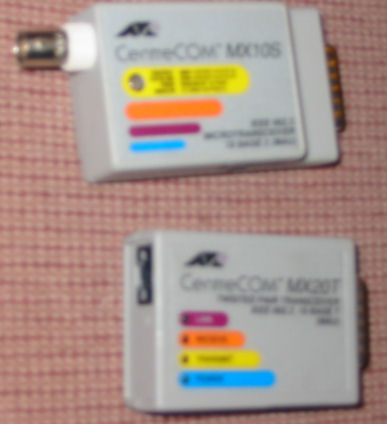
(typical is CentreCom MX20T, twisted pair tranceiver 10 base T, with test switch). Male DB-15, female RJ-45 connectors
Adapters from DB15 to BNC (Thick Ethernet to thin coax 10b2 ethernet), $12 each.
(typical is CentreCom MX10S, twisted pair tranceiver 10 base 2, with test switch). Male DB-15, BNC connectors.
Here are the brief text instructions as packaged by CenterCom.
Adapters from AAUI to BNC (Apple network to thin coax 10b2 ethernet), $15 each.
These adapters plug into Apple network cards and computers with female AAUI (very small) network connectors.
Ethernet adapters for Apple-compatible printers, networks
![[asantetalk]](asante_talk.jpg)
Unit with A/C supply, copy of 8-page docs, no software included, $59 plus shipping.
Ethernet to printer adapters, non-Apple
Xircom Parallel port Multiplexor III adapter for above, one unit
Xerox MIcro Print Server, 3400X, uses 5V DC supply.
Appletalk, LocalTalk, Phonenet and LocalTalk items
Prices start at $10 each for the items below; ask for specific items
590-0338-A, Apple LocalTalk adapter with miniDIN-8.
Apple LocalTalk adapter with DB-9,
590-0310-B, Apple LocalTalk cable. .
590-0300-B, Apple Localtalk coupler between cables
![[connector]](db9_phonenet.jpg)
phonenet adapter to miniDIN-8, two RJ11 jacks, without terminators:
phonenet adapter with LED's (lights) to miniDIN-8, two RJ11 jacks, without terminators:
phonenet adapter to miniDIN-8, ONE RJ11 jack:
phonenet adapter to DB-9 (for the Mac Plus, 128K, 512K), two RJ11 jacks, without terminators:
RJ-11 terminator plug for Phonenet: $ask about price
telephone cords, RJ-11 plugs at each end, 3 to 6 foot available, ask about price.
Networking connections, printers, software issues
Connector Terminology
![[connector]](net_aaui.jpg) "AUI" or"AAUI" is a really small D-shaped network
connector used on some old PowerMacs and Apple printers with Ethernet.
"AUI" or"AAUI" is a really small D-shaped network
connector used on some old PowerMacs and Apple printers with Ethernet.
![[connector]](net_rj45.jpg) RJ-45" is the connector used for 10bT (twisted pair Ethernet)
networking. It looks like a slightly larger version of the RJ-11 connector for Phonenet products
running Appletalk.
RJ-45" is the connector used for 10bT (twisted pair Ethernet)
networking. It looks like a slightly larger version of the RJ-11 connector for Phonenet products
running Appletalk.
![[connector]](net_rj11.jpg) RJ-11 is the wired telephone connector used for modems and for PhoneNet.
Older Mac computers and printers also use Appletalk networking, mostly with PhoneNet.
RJ-11 is the wired telephone connector used for modems and for PhoneNet.
Older Mac computers and printers also use Appletalk networking, mostly with PhoneNet.
![[connector]](net_minidin8.jpg) The modem/printer female connector called "miniDIN-8", is also connected to Appletalk/Phonenet and other adapters. miniDIN-8 cables have a male connector.
The modem/printer female connector called "miniDIN-8", is also connected to Appletalk/Phonenet and other adapters. miniDIN-8 cables have a male connector.
Printers and Ethernet
Ethernet for Apple printers
Telecomm or serial file transfers
software and drivers
Herb Johnson
New Jersey, USA
follow this link to email me @ my email address